Live translation in Google Meet, Zoom and Teams — what each one actually supports
All three added spoken translation. All three cover far fewer languages than the marketing suggests, and most of Asia is missing. A plain comparison as of August 2026.
Prakash Vakhesa · August 17, 2026 · 3 min read
Every major meeting platform now advertises live translation. If your calls are English–Spanish you're well served. If they involve Hindi, Arabic, Gujarati, Vietnamese or Japanese, the picture is very different from what the feature pages imply.
Here's where each stands as of August 2026. These features are moving quickly, so check current docs before making a decision — but the shape of the gap has been consistent for a while.
Google Meet
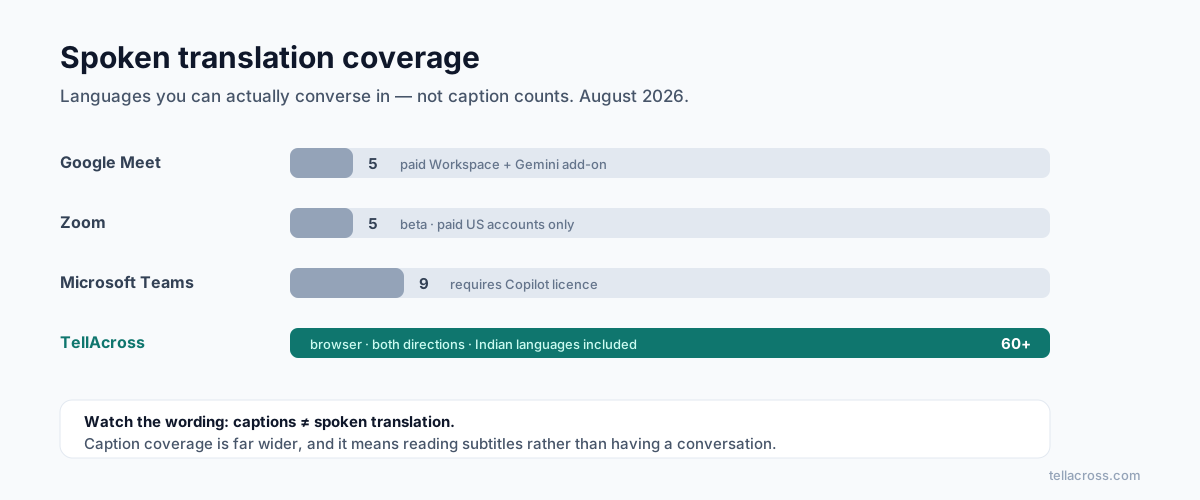
Speech translation is generally available to premium subscribers, and it works well. The catch is coverage: it supports English paired with five languages — Spanish, French, German, Brazilian Portuguese and Italian — in both directions.
It needs a paid Workspace plan with a Gemini add-on. A much wider 70+ language expansion is in private preview, which will change this — but "private preview" is not something you can schedule a client call around today.
There's a second limitation worth knowing: the AI meeting notes produce their Decisions section in English only, so a call conducted in Japanese or Hindi gets none of that benefit either.
Zoom
Zoom's Voice Translator — where you speak one language and others hear another — launched in 2026 but remains narrow. As of mid-2026 it is in beta, covers five languages (English, Chinese, French, Japanese, Spanish), and is limited to paid US-based accounts.
Zoom's translated captions are a separate, more mature feature covering around 46 languages. Worth being clear about the difference: captions are text you read while continuing to listen to a language you don't understand. That's useful, but it isn't a conversation.
Microsoft Teams
Teams splits it in two. Translated live captions sit behind Teams Premium, roughly $10 per user per month, covering 30+ languages. The AI interpreter agent — actual spoken translation — launched for Copilot-licensed customers and supports nine languages.
Teams has the broadest caption coverage of the three, and the same narrow spoken coverage.
The pattern
Line them up and the same shape appears:
| Platform | Spoken translation | Requirement |
|---|---|---|
| Google Meet | 5 languages ↔ English | Paid Workspace + Gemini add-on |
| Zoom | 5 languages (beta) | Paid, US accounts only |
| Teams | 9 languages | Copilot licence |
Two things follow.
Spoken translation is far narrower than captions. Vendors quote the caption number in marketing because it's bigger. Read carefully to see which one a feature page is describing — reading subtitles and having a conversation are not the same product.
The coverage tracks European business languages. Spanish, French, German, Portuguese, Italian are consistently first. Hindi, Bengali, Gujarati, Tamil, Urdu, Arabic and Vietnamese — between them well over a billion speakers — appear late or not at all in the spoken tier.
If your business is North America and Western Europe, the platform you already pay for probably covers you. If your calls involve South Asia, the Middle East or much of Southeast Asia, you're outside what these features currently do, regardless of price tier.
What we built instead
That gap is why TellAcross exists. It runs in the browser with no plugin, covers 60+ languages with spoken output in both directions, and we deliberately invested in Indian languages first — Hindi, Gujarati, Bengali, Tamil, Telugu, Marathi, Punjabi and Urdu — because that's precisely where the big platforms are weakest and where most tools handle the accents and script badly.
It isn't a replacement for your meeting platform. It's for the calls the meeting platform's translation doesn't reach.
How to actually decide
Ignore the headline language count and ask three questions:
- Spoken or captions? If people need to converse rather than read, only the spoken tier counts.
- Are your specific pairs supported? Not "60 languages" — your actual pair, in both directions.
- What does it cost per seat, per month, for everyone who needs it? Per-seat add-ons across a team add up faster than usage-based pricing when translation is occasional.
If the answers work on the platform you already own, use it. If your languages aren't on the list, no plan tier will fix that — and that's the case worth testing an alternative for.