Can you use Google Translate on a video call? What it does and doesn't do
Google Translate is excellent at text, signs and travel conversations. On a Zoom or Meet call it hits three specific walls — including one most people don't discover until mid-meeting.
Prakash Vakhesa · August 29, 2026 · 5 min read
Disclosure: we make TellAcross, a call translation tool, so we have an interest here. That's exactly why the first half of this post is about what Google Translate does better than we do — you should use it where it fits, and it's free.
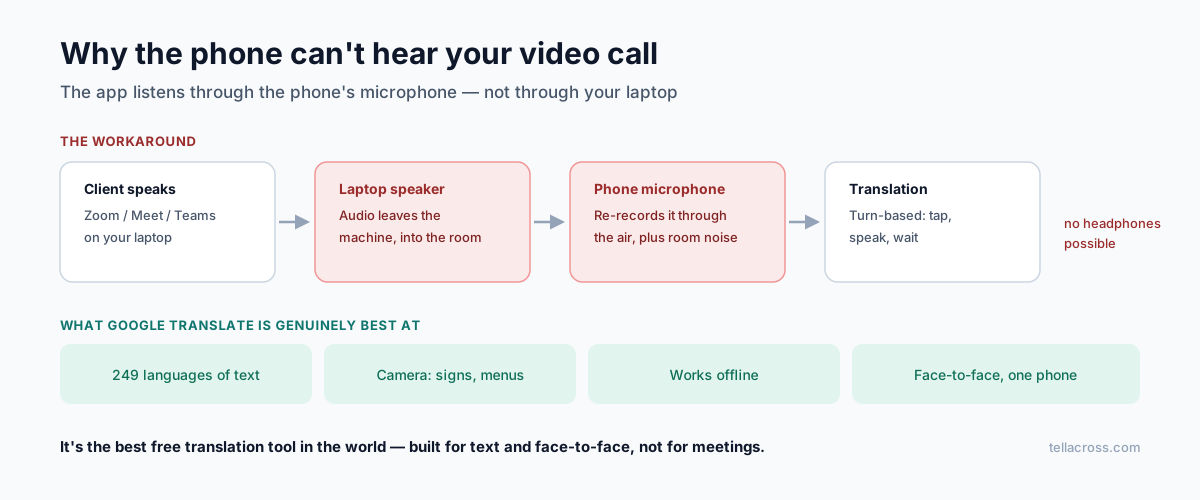
Short answer: you can use Google Translate alongside a video call, but not inside one. The app listens through your phone's microphone, so it can't hear audio coming from a Zoom, Teams or Meet window on your laptop. People work around this by holding the phone near the speakers, which mostly works and mostly sounds bad.
Here's the full picture.
What Google Translate is genuinely excellent at
Not faint praise — for most translation tasks it's the right tool and it costs nothing:
- Text translation across 249 languages, more than any competitor
- Camera translation — point at a menu, a sign, a form, and read it
- Offline mode with downloaded language packs, which matters when travelling
- Document translation for a quick read of a foreign-language PDF
- Turn-based conversation mode for face-to-face exchanges — asking directions, ordering, a short conversation at a market
If your need is any of the above, stop reading and go use it. It's free, it's excellent, and nothing below is a criticism of it.
The three walls on a video call
1. It's turn-based, not simultaneous. Google Translate's streaming design produces a tap-speak-wait experience — it doesn't translate while you're still talking. Fine when two people share one phone; awkward on a business call where each turn takes double the time and everyone waits.
2. The microphone can't hear your call. This is the one people discover mid-meeting. The app listens through your phone's mic, so it cannot hear audio from a Zoom window, a Teams meeting or a Meet tab. Your client's voice is coming out of your laptop speakers, and the phone is a separate device that has no access to it.
The workaround is physical: put the phone next to the laptop speaker and turn the volume up. That means the phone hears speaker audio re-recorded through the air, mixed with room noise, at whatever quality the laptop speaker manages. Speech recognition degrades sharply on re-recorded audio — it's the single biggest driver of translation errors. It also means you can't use headphones, so everyone in your room hears the whole call.
3. It can't dial a translated phone call. If your client is on an ordinary phone rather than a video platform, Google Translate has no path to that call at all.
Where conversation mode actually stands
Worth being precise, because coverage of this feature runs ahead of availability. The live audio conversation mode is beta-only on Android, in the US, Mexico and India, with iOS and wider rollout planned later in 2026. It needs an internet connection.
So if you're on iPhone, or outside those three countries, the feature you read about may not be available to you yet.
Google Meet is a different product
A common confusion: Google Translate (the app) and Google Meet's translation are separate things with separate coverage.
Meet's speech translation is built into the call — no phone-next-to-speaker needed — but it covers only five languages paired with English, requires a paid Workspace plan with a Gemini add-on, and has a 90-minute session limit. The 70+ language Gemini 3.5 expansion is in private preview for enterprise customers, not generally available.
If you're on Workspace, your calls are in those five languages, and you can enable it — that's a good answer and you don't need anything else.
So when is Google Translate the right call?
Yes, use it for: signs, menus, documents, emails, chat messages, face-to-face conversations where you can share a phone, travel, and any situation where a mistake costs you a repeated sentence rather than money.
Look elsewhere for: scheduled video calls with clients, multi-person meetings, phone calls, anything where a misheard number or name has consequences, and any conversation where holding a phone to a speaker would be visibly unprofessional.
That last one is worth taking seriously. If you're a lawyer, clinic or supplier, the workaround itself communicates something to the person on the other end. There's a separate question about whether it's appropriate for client calls at all in professional settings.
What actually fixes the mechanics
The structural fix is translation that lives inside the call rather than beside it — hearing the call audio directly instead of through the air, running both directions simultaneously instead of turn by turn.
That's what TellAcross does: browser-based, so the other person clicks a link and installs nothing, 60+ languages spoken both ways, with a transcript you can export afterwards. Ten free minutes a month is enough to run one real call and compare it against the phone-by-the-speaker approach.
If you're sticking with Google Translate, do this
Genuinely useful even without switching tools:
- Download the language pack before you need it — offline mode saves you when the connection drops.
- Use a proper speaker, not the laptop's, if you must do the phone-near-the-audio approach. A cheap external speaker meaningfully improves what the phone hears.
- Type instead of speak when accuracy matters more than speed. Text translation is significantly more accurate than speech, because it skips the recognition step where most errors enter.
- Send numbers, dates and names in writing. True with every tool, most important with this one.
- Confirm understanding by asking them to say the plan back, not "do you understand?" — which gets a yes in every language.
The honest summary: Google Translate is the best free translation tool in the world, and it was built for text and face-to-face moments rather than for meetings. Using it for a client video call isn't wrong — it's just using a hammer on a screw, and the reason it feels awkward is that it is.