Live translation is now built into your phone — here's what it actually covers
iOS 26 puts live translation in AirPods, Samsung has it on Galaxy, T-Mobile runs it on the network. What each one really supports, and the gaps the launch coverage skips.
Prakash Vakhesa · August 21, 2026 · 3 min read
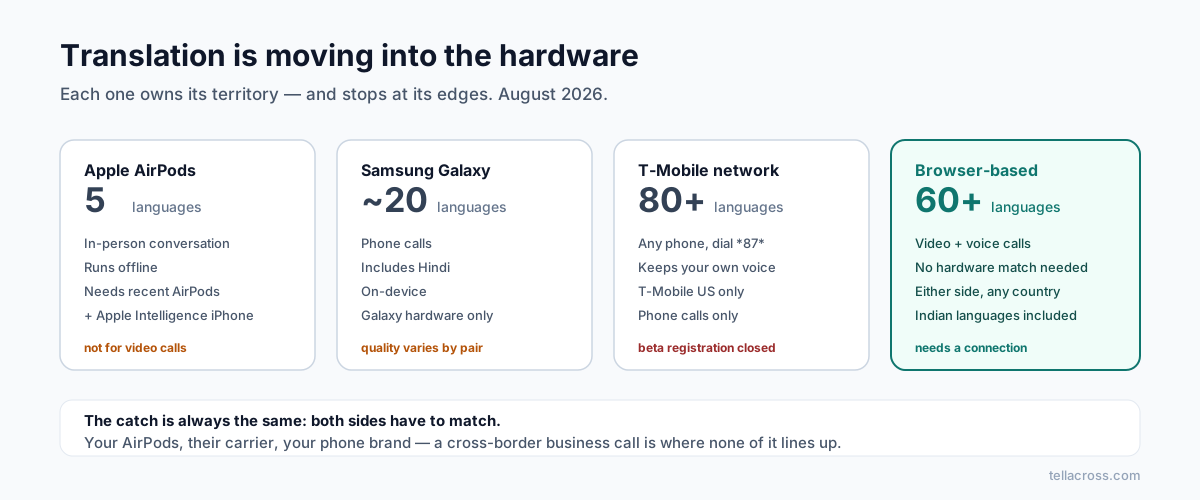
Translation stopped being an app you download and became a feature of the phone itself. Apple's version is the one everyone's writing about right now, so let's start there — and then look at what the launch coverage tends to skip.
iOS 26: Live Translation with AirPods
The headline feature: you wear AirPods, the other person speaks Spanish, and the English lands directly in your ear. You reply in English and your iPhone speaks the Spanish back. Noise cancellation even lowers the other speaker's voice so the translation is easier to follow. Reviewers are impressed — it genuinely works — and it runs on-device, so it works offline, which is a real advantage travelling.
Now the constraints, because they decide whether it's useful to you:
Languages: five. English (US/UK), French, German, Brazilian Portuguese, Spanish. Italian, Japanese, Korean and simplified Chinese are promised later. No Hindi, no Arabic, no Gujarati, Tamil, Bengali or Vietnamese — and no announced date for any of them.
Hardware: recent and specific. AirPods Pro 2 or later, AirPods 4 with ANC, or AirPods Max 2 — paired with an Apple Intelligence-capable iPhone on iOS 26. An iPhone 14 doesn't qualify, whatever AirPods you own.
It's built for in-person conversation. One person with AirPods, one person physically present. It is not a video-call feature, and the experience is asymmetric — you hear translation privately in your ear; they hear your phone's speaker.
Samsung and T-Mobile
Samsung Galaxy phones have had Live Translate on calls since the S24 — real-time voice translation on ordinary phone calls, on-device for supported languages. Coverage is broader than Apple's (around 20 languages including Hindi and Arabic) though quality varies more between pairs.
T-Mobile US went a different route: translation running on the network itself, so it works with any handset — but only for calls on T-Mobile, only in the US.
The pattern, again
We saw the same shape when we compared Google Meet, Zoom and Teams: European business languages first, everything else later or never. The built-in phone features repeat it. If your conversations are English↔Spanish or English↔German, the phone in your pocket may already be enough — use it, it's free.
The gaps are consistent too:
Language coverage. The five Apple launched with cover a minority of the world's speakers. The languages with the most need — the Indian languages, Arabic, Vietnamese — are exactly the ones missing or weakest.
Both sides need the right setup. Apple's version needs your specific AirPods and iPhone. Samsung's needs a Galaxy. T-Mobile's needs their network. The person you're calling has their own phone, their own carrier, their own country — and a cross-border business call is precisely where none of these line up.
Calls, not video meetings. None of these translate your video calls with clients, your team standups, or a multi-person conversation where two participants need two different languages.
Where that leaves the rest
For a browser-based call where each participant simply speaks their own language and hears the other's — with no hardware requirement on either side, and coverage that treats Hindi, Gujarati, Bengali, Tamil and Urdu as first-class — that's the gap TellAcross was built for. It's not competing with AirPods at a market stall in Lisbon; Apple owns that moment now, deservedly. It's for the scheduled call with a client in Ahmedabad or a supplier in Hanoi, which no built-in feature currently reaches.
The practical advice: check whether your actual language pairs and your actual call type are covered by what you already own. If yes, you're done. If your languages aren't on those short lists — that's not a settings problem, and a newer phone won't fix it.