How to run a team meeting where people speak different languages
Audio quality matters more than translation quality, fluency isn't interpreting competence, and one language of record prevents most downstream confusion. A practical guide.
Prakash Vakhesa · August 15, 2026 · 4 min read
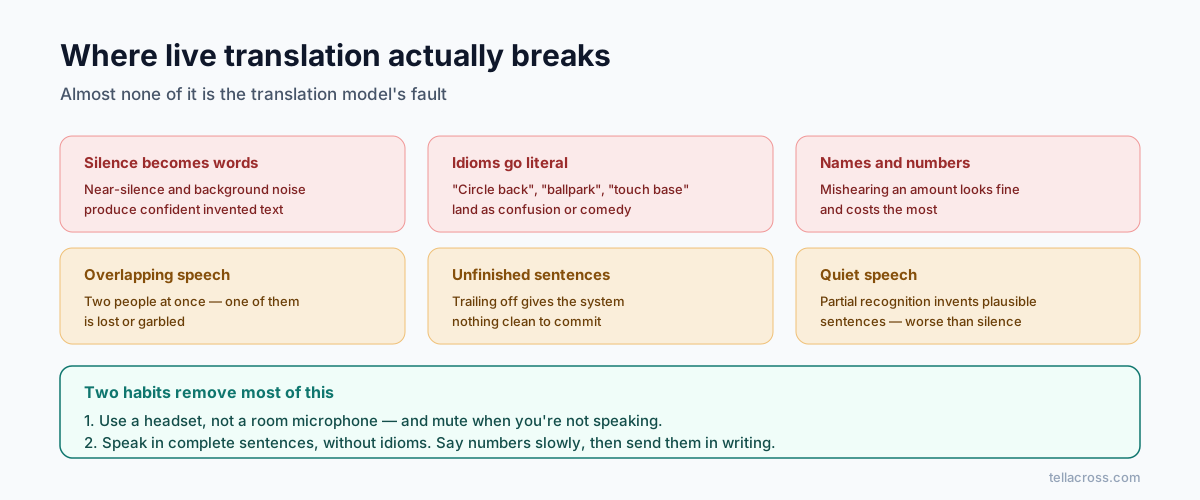
Multilingual meetings usually fail in predictable ways, and almost none of them are about translation accuracy. Here's what actually determines whether the meeting works.
Treat language access as infrastructure, not an accommodation
The single biggest predictor of a good multilingual meeting is whether language was planned alongside scheduling and agenda, or bolted on when someone realised a participant would struggle. The recommendation from people who run these professionally is to plan it as part of the meeting infrastructure, like security or documentation.
Practically: decide before the invite goes out whether people need translated materials, live interpretation, or both.
Audio quality beats everything
This is the finding that surprises people, and it's consistent: poor audio undermines multilingual sessions more than any other factor. Bad sound forces interpreters — human or machine — to guess, and guessing is where errors enter.
It's also the cheapest thing to fix:
- A basic headset beats laptop speakers and a room mic, every time.
- One person per microphone. Conference-room speakerphones with six people around a table are the worst case for any translation system.
- Mute when not speaking. Background noise gets transcribed as speech and confidently translated into nonsense.
- Build a two-minute audio check into the start of the meeting. It feels excessive twice and then saves a meeting.
If you do nothing else on this list, do this one.
Consecutive or simultaneous — pick deliberately
Consecutive (the speaker pauses, then it's rendered) suits small, slower meetings. It roughly doubles the time and everyone hears both versions, which is useful when precision matters and people want to catch errors.
Simultaneous (near real-time, in parallel) suits larger groups, executive meetings and trainings where stopping constantly would kill momentum.
Choosing accidentally is what produces a stilted meeting where nobody knows whether to wait.
Your bilingual colleague is not an interpreter
Worth saying because it's the default move and it quietly costs you a good employee's attention: fluency is not interpreting competence.
Interpreting while also participating is genuinely hard. The person doing it can't contribute properly — they're processing the previous sentence while the next one starts. You've converted a contributor into a utility, and you get worse interpreting and lose their input. If they're in the meeting for their expertise, don't also make them the language channel.
Adjust how people speak, not just the tooling
A few habits improve every translation system, human or AI, and cost nothing:
- Complete sentences. Trailing off gives the system nothing clean to work with.
- One idea per turn. Three chained thoughts in one breath will lose one.
- Skip idioms. "Let's circle back and take this offline" translates into confusion in most languages. "Let's discuss this later" survives.
- Say numbers and names slowly, and put them in writing too. These are where errors do the most damage.
- Pause between speakers. Overlapping talk is the hardest input there is.
One language of record
Decide the single language in which decisions and action items are written, and write them there every time. Adding a translated summary is fine, but keep one definitive version so there's no ambiguity about which text governs when two versions drift.
This prevents the failure where two teams leave the same meeting with genuinely different understandings of what was agreed — each with written notes supporting their reading.
Check understanding properly
"Does everyone understand?" produces nods across every culture and language, and tells you nothing. In many cultures saying no to a manager in front of colleagues is not a realistic option.
Ask someone to say back what they'll do next, in their own words. It takes twenty seconds and surfaces the gap while it's still cheap to fix.
Where tooling fits
If your meeting platform covers your language pairs for spoken translation, use it. Coverage is narrower than the marketing implies — Google Meet, Zoom and Teams each support only a handful of languages for spoken output, mostly European. We compared them in detail here.
If your team's languages aren't on those lists, TellAcross covers 60+ languages with spoken translation in both directions, in the browser, with a live transcript you can export as the written record for the point above. Ten minutes free every month is enough to test it with a real meeting rather than a demo.
Whatever you use: fix the audio first. The best translation in the world can't recover a sentence it couldn't hear.