Real-time translation for Indian languages — why most tools handle them badly
Hindi, Gujarati, Bengali, Tamil, Telugu, Marathi, Punjabi, Urdu — over a billion speakers, and consistently the weakest coverage in mainstream translation tools. What breaks, and what to test before trusting one.
Prakash Vakhesa · August 19, 2026 · 4 min read
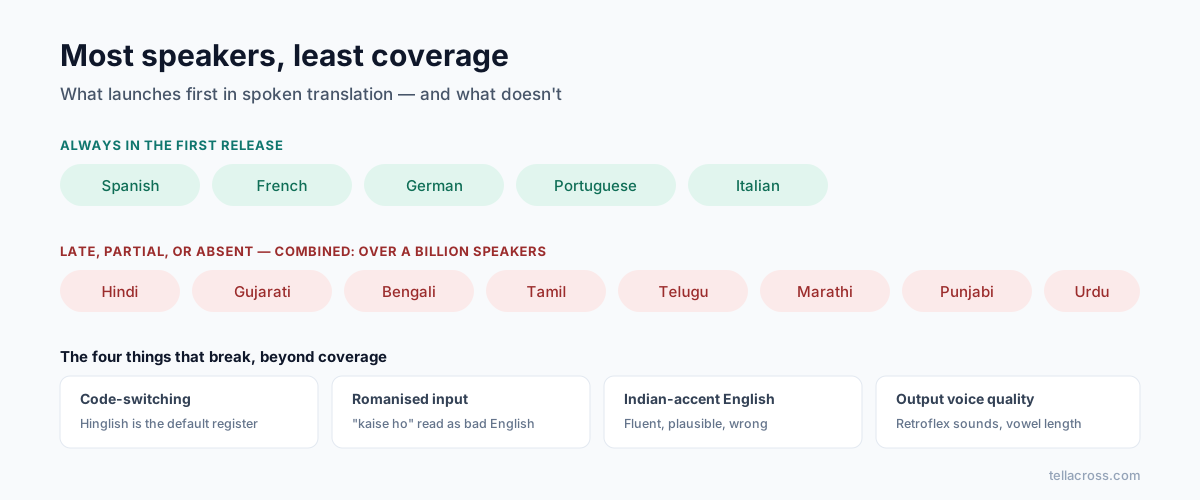
Add up Hindi, Bengali, Tamil, Telugu, Gujarati, Marathi, Punjabi and Urdu and you have more speakers than English. Yet look at any mainstream live-translation feature and the pattern is identical: Spanish, French, German first — Indian languages late, partial, or absent.
Apple's new AirPods Live Translation launched with five European languages. Google Meet's spoken translation: five European languages. Zoom's Voice Translator: five, none Indian. This isn't malice — it's where their first markets are. But if your calls happen in Indian languages, you're choosing from the tools that treat them as an afterthought, so it's worth knowing exactly how they fail.
The four things that actually break
Code-switching. This is the big one. Real Indian speech mixes languages constantly — a Hindi sentence with English technical terms, a Gujarati conversation that drops into English for numbers and dates, full "Hinglish". This is normal speech, not an edge case. Most systems auto-detect a language per sentence, and mixed input makes them guess — and a wrong guess doesn't fail loudly, it produces a confident translation in the wrong direction. We rebuilt our own detection logic around this specific case because it's the default register of Indian business speech, not an exception to it.
Romanised input. People type and sometimes speak transliterated — "kaise ho" rather than कैसे हो. A system that only recognises Devanagari treats romanised Hindi as bad English. Handling both scripts as the same language is table stakes for Indian users and rare in practice.
Accent coverage. English spoken with Indian accents is some of the most common English on earth, and speech models trained mostly on American and British audio mishear it at far higher rates. The result is the worst failure mode in translation: plausible, fluent, wrong — the sentence reads fine and says something you didn't.
Voice quality out. Text-to-speech for Indian languages often sounds flat or mispronounces retroflex consonants and vowel length — details that make output sound foreign to a native ear. Bengali and Tamil suffer most. If the other person winces at the voice, they stop trusting the words.
What exists today
JioTranslate is a genuine effort on Indian languages — text, speech and calls — but it's consumer-focused, India-centric, and not built for business video calls with someone abroad.
Samsung Live Translate includes Hindi on Galaxy phone calls; quality is fair for Hindi, thinner beyond it, and it's phone-calls-only on Samsung hardware.
Google Translate covers many Indian languages for text and conversation mode, and remains the best free fallback — but conversation mode is turn-based on one shared phone, not a live call.
Big meeting platforms — covered in our comparison: captions maybe, spoken translation no.
What we did differently
TellAcross invested in Indian languages first — Hindi, Gujarati, Bengali, Tamil, Telugu, Marathi, Punjabi and Urdu as first-class citizens, on live video calls, both directions. Code-switching handled as normal speech, romanised input recognised, and industry modes that keep legal and medical terminology exact rather than paraphrased. That focus is the founding reason the product exists: the languages with the most speakers were being served last, and one of us grew up speaking one of them.
How to test any tool honestly
Ten minutes, with a real speaker, before you rely on anything — including us:
- Speak naturally, code-switched. Don't perform textbook Hindi; mix in English the way you actually talk. This is where most tools fall over first.
- Say numbers, dates and names. An amount misheard is the most expensive error a business call can contain.
- Test both directions. Tools are frequently better into English than out of it — and the out-of-English direction is what your client hears.
- Have a native speaker judge the output voice. Not "is it understandable" but "would you trust the person speaking like this".
- Use your real accent, mic and room — not a demo video's studio audio.
Any tool that survives all five with your actual language pair is worth paying for. Most won't survive the first. Ours has a free tier precisely so you can run this test on a real call instead of taking a blog post's word for it — including this one.